1. Introduction
I have created this teaching chatbot that can answer questions from class IX, subject SST, on the topic "Democratic politics". I have used RAG (Retrieval-Augmented Generation), Llama Model as LLM (Large Language Model), Qdrant as a vector database, Langchain, and Streamlit.
2. How to run the code?
Github repository link: https://github.com/ranjankumar-gh/teaching-bot/
Steps to run the code
-
git clone https://github.com/ranjankumar-gh/teaching-bot.git -
cd teaching-bot -
python -m venv env -
Activate the environment from the
envdirectory. -
python -m pip install -r requirements.txt -
Before running the following line, Qdrant should be running and available on localhost. If it's running on a different machine, make appropriate URL changes to the code.
python data_ingestion.py
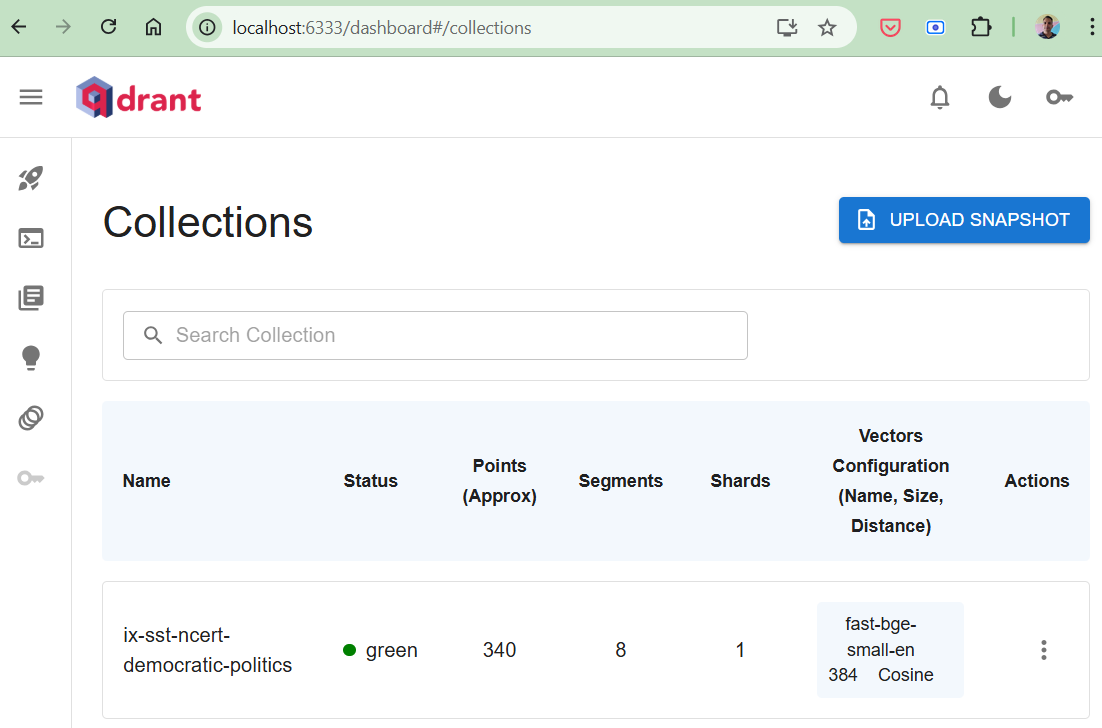
After running this, http://localhost:6333/dashboard#/collections should appear like figure 1. -
Run the web application for the chatbot by running the following command. The web application is powered by Streamlit.
streamlit run app.py
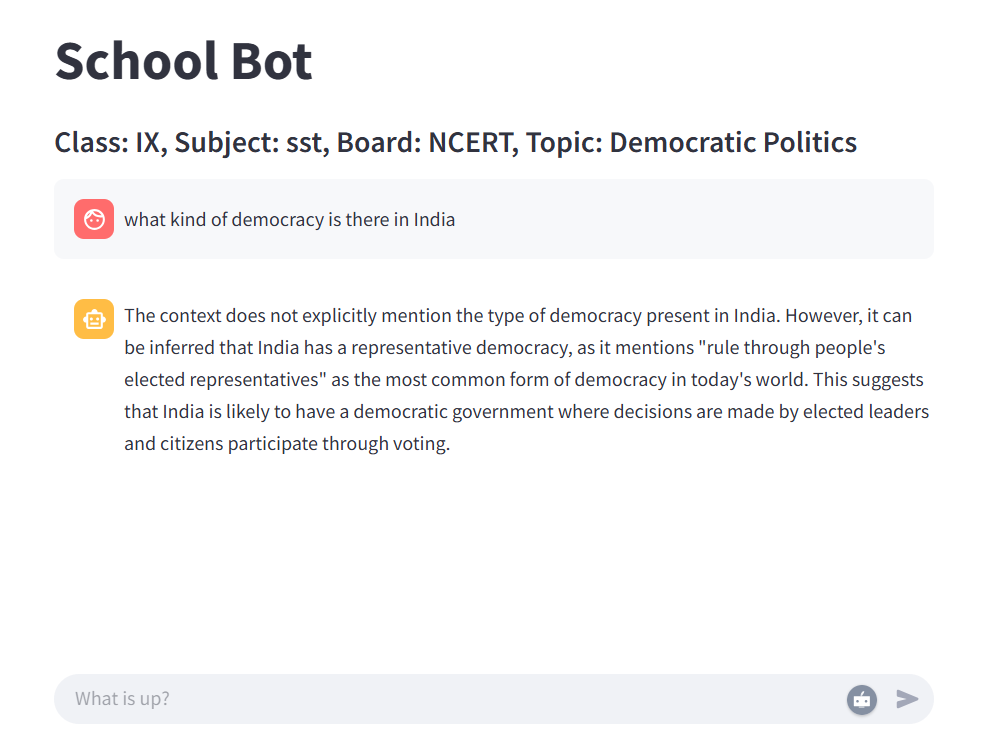
The interface of the chatbot appears as in Figure 2.
3. Data Ingestion
Data: PDF files have been downloaded from the NCERT website for Class IX, subject SST, from the topic "Democratic politics". These files are stored in the directory ix-sst-ncert-democratic-politics. The following are the steps for data ingestion:
-
PDF files are loaded from the directory.
-
Text contents are extracted from the PDF.
-
Text content is divided into chunks of text.
-
These chunks are transformed into vector embeddings.
-
These vector embeddings are stored in the Qdrant vector database.
-
This data is stored in Qdrant with the collection name "
ix-sst-ncert-democratic-politics".
The following is the code snippet for data_ingestion.py.
################################################################ Data ingestion pipeline # 1. Taking the input pdf file# 2. Extracting the content# 3. Divide into chunks# 4. Use embeddings model to convet to the embedding vector# 5. Store the embedding vectors to the qdrant (vector database)################################################################import osfrom langchain_community.document_loaders import PDFMinerLoaderfrom langchain.text_splitter import CharacterTextSplitterfrom qdrant_client import QdrantClientpath = "ix-sst-ncert-democratic-politics"filenames = next(os.walk(path))[2]for i, file_name in enumerate(filenames): print(f"Data ingestion for the chapter: {i}") # 1. Load the pdf document and extract text from it loader = PDFMinerLoader(path + "/" + file_name) pdf_content = loader.load() print(pdf_content) # 2. Split the text into small chunks CHUNK_SIZE = 1000 # chunk size not greater than 1000 chars CHUNK_OVERLAP = 30 # a bit of overlap is required for continued context text_splitter = CharacterTextSplitter(chunk_size=CHUNK_SIZE, chunk_overlap=CHUNK_OVERLAP) docs = text_splitter.split_documents(pdf_content) # Make a list of split docs documents = [] for doc in docs: documents.append(doc.page_content) # 3. Create vectordatabase(qdrant) client qdrant_client = QdrantClient(url="http://localhost:6333") # 4. Add document chunks in vectordb qdrant_client.add( collection_name="ix-sst-ncert-democratic-politics", documents=documents, #metadata=metadata, #ids=ids ) # 5. Make a query from the vectordb(qdrant) search_results = qdrant_client.query( collection_name="ix-sst-ncert-democratic-politics", query_text="What is democracy?" ) for search_result in search_results: print(search_result.document, search_result.score)4. Chatbot Web Application
The web application is powered by Streamlit. Following are the steps:
-
A connection to the Qdrant vector database is created.
-
User questions are captured through the web interface.
-
The question text is transformed into a vector embedding.
-
This vector embedding is searched in the Qdrant vector database to find the most relevant content similar to the question.
-
The text returned by the Qdrant acts as the context for the LLM.
-
I have used Llama LLM. The query, along with context, is sent to the Llama for an answer to be generated.
-
The answer is displayed on the web interface as the answer from the bot.
Following is the code snippet for app.py.
# Initialize chat historyif "messages" not in st.session_state: st.session_state.messages = []# Display chat messages from history on app rerunfor message in st.session_state.messages: with st.chat_message(message["role"]): st.markdown(message["content"])# React to user inputif query := st.chat_input("What is up?"): # Display user message in chat message container st.chat_message("user").markdown(query) # Add user message to chat history st.session_state.messages.append({"role": "user", "content": query}) # Connect with vector db for getting the context search_results = qdrant_client.query( collection_name="ix-sst-ncert-democratic-politics", query_text=query ) context = "" no_of_docs = 2 count = 1 for search_result in search_results: if search_result.score >= 0.8: #print(f"Retrieved document: {search_result.document}, Similarity score: {search_result.score}") context = context + search_result.document if count >= no_of_docs: break count = count + 1 # Using LLM for forming the answer template = """Instruction: {instruction} Context: {context} Query: {query} """ prompt = ChatPromptTemplate.from_template(template) model = OllamaLLM(model="llama3.2") # Using llama3.2 as llm model chain = prompt | model bot_response = chain.invoke({ "instruction": """Answer the question based on the context below. If you cannot answer the question with the given context, answer with "I don't know." """, "context": context, "query": query }) print(f'\nBot: {bot_response}') #response = f"Echo: {prompt}" # Display assistant response in chat message container with st.chat_message("assistant"): st.markdown(bot_response) # Add assistant response to chat history st.session_state.messages.append({"role": "assistant", "content": bot_response})Related Articles
- Install, run, and access Llama using Ollama
- Fact-Checking in LLM Systems: From Hallucinations to Verifiable AI
Follow for more technical deep dives on AI/ML systems, production engineering, and building real-world applications:


